Moving from ReplayMod and Flashback
Hindsight opens ReplayMod replays and converts to and from ReplayMod and Flashback, so your old recordings come with you, and your new ones can go back the other way.
If you’ve used ReplayMod or Flashback, you don’t have to start again. Hindsight finds your existing recordings, and anything you record with Hindsight can be converted for ReplayMod or Flashback.
ReplayMod and Flashback run on Fabric. Hindsight runs on NeoForge and Fabric, so NeoForge players and modpacks get session replays too.
ReplayMod
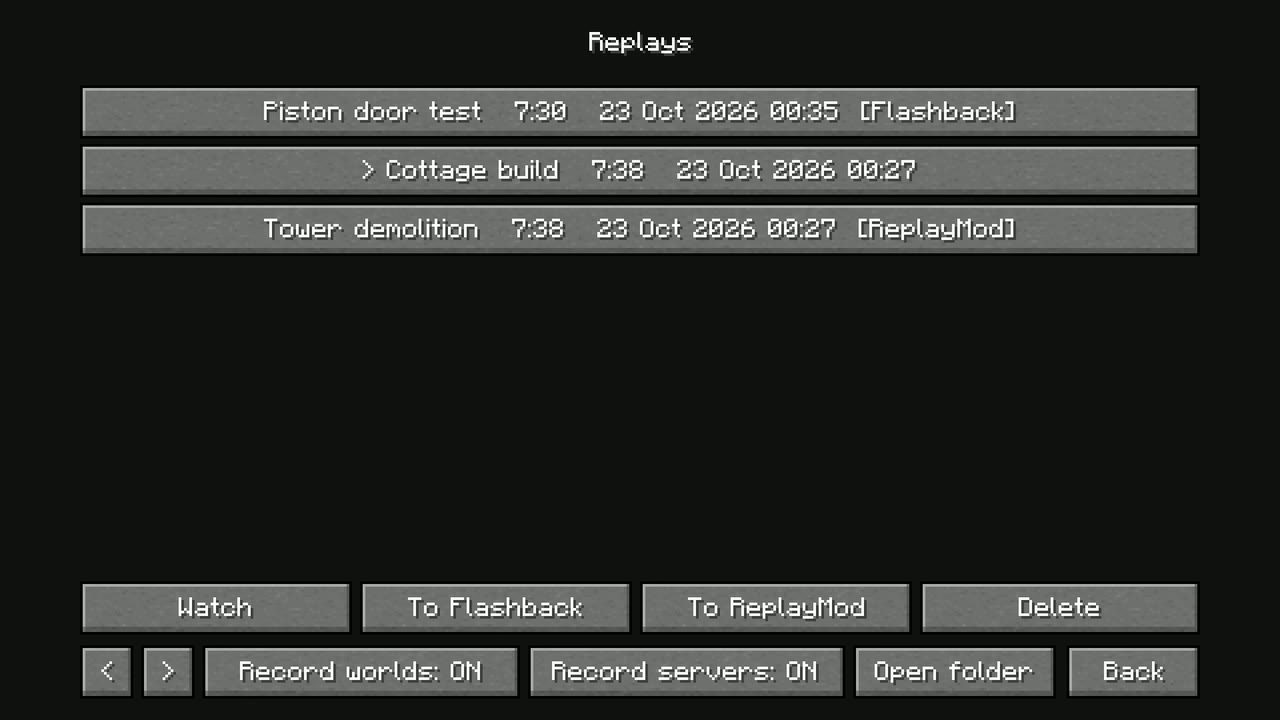
Hindsight saves its own recordings in its own format, .hsr. It also opens ReplayMod’s .mcpr replays directly, and converts its own replays to ReplayMod’s format when you ask.
- Your ReplayMod recordings in
replay_recordings/appear on Hindsight’s Replays screen, marked [ReplayMod]. Press Watch to open one as it is. Keyframes and markers you add while watching are saved back into that file, in ReplayMod’s own format, so ReplayMod sees them too. - Hindsight’s recordings go to ReplayMod with To ReplayMod, on the Replays screen or under File in the replay editor. It converts the replay to a ReplayMod
.mcprfile inreplay_recordings/, where ReplayMod looks. - Camera paths and markers go along with the conversion. A path you make in a Hindsight replay reaches ReplayMod when you use To ReplayMod, not before, so convert again after changing it. Keyframes made in ReplayMod are there when you open its replays in Hindsight.
Flashback
Flashback has its own format, so Hindsight converts.
- Your Flashback recordings in
flashback/replays/appear on the Replays screen, marked [Flashback]. Press Import & watch: Hindsight converts it into a Hindsight.hsrcopy, keeping the markers and camera keyframes, and opens it. The Flashback file isn’t changed, and the copy stays in your Replays list. - To Flashback on the Replays screen or under File in the replay editor works on Hindsight and ReplayMod replays. It writes
flashback/replays/<name>.zip, and puts your camera keyframes in Flashback’s editor-state folder so Flashback’s editor has them. - Voice chat recorded with Simple Voice Chat comes along both ways.
Finding your way around
If you’re used to the other mods, here’s where things are in Hindsight:
| You want to | In Hindsight |
|---|---|
| Find your recordings | Replays, top-left of the title screen |
| Pause and change speed | K, [ and ] while watching, or the replay editor |
| Open the editor | ’ while watching |
| Watch from a player’s view | Click them; sneak to stop |
| Add a camera keyframe | + Keyframe in the editor |
| Render a video | Export video in the editor: MP4 or WebM with sound, PNG frames, any size up to 4K or vertical, 360°, transparent or green-screen sky (built in; FFmpeg is used if you have it) |
| Queue several renders | Add to queue in Export settings, then Export all |
| Hide players, name tags or particles; change the time or weather | Visuals in the editor |
| Zoom (field of view), roll, or follow a player in a camera path | The camera row of the editor |
| Cut a replay down | File > Save a trimmed copy |
See watching replays and the editor and exporting video for the details.
Limits
These come from how Minecraft replays work, and apply to ReplayMod and Flashback as well:
- A replay opens on the Minecraft version it was recorded on. The Replays screen shows replays from other versions with the version they need, and won’t open them.
- Replays recorded with mods need the same mods to watch. A replay of a modded world is full of that mod’s blocks and items, and the game needs them to show it.
- Recordings from NeoForge in Fabric-only mods. A NeoForge recording opened in ReplayMod or Flashback (which run on Fabric) needs the same content on the Fabric side. A recording of plain Minecraft is fine; one full of NeoForge-only mods won’t open there.