A Minecraft mod by Hardline Interactive
 Noticeboard
Hang glowing boards on your walls and share notes, to-do lists, shopping lists of items and announcements with everyone in your world.
- Developer
- Hardline Interactive
- Version
- 1.1.0
- Minecraft
- 1.21.1 and 1.20.1
- Loaders
- NeoForge, Forge and Fabric
What it does
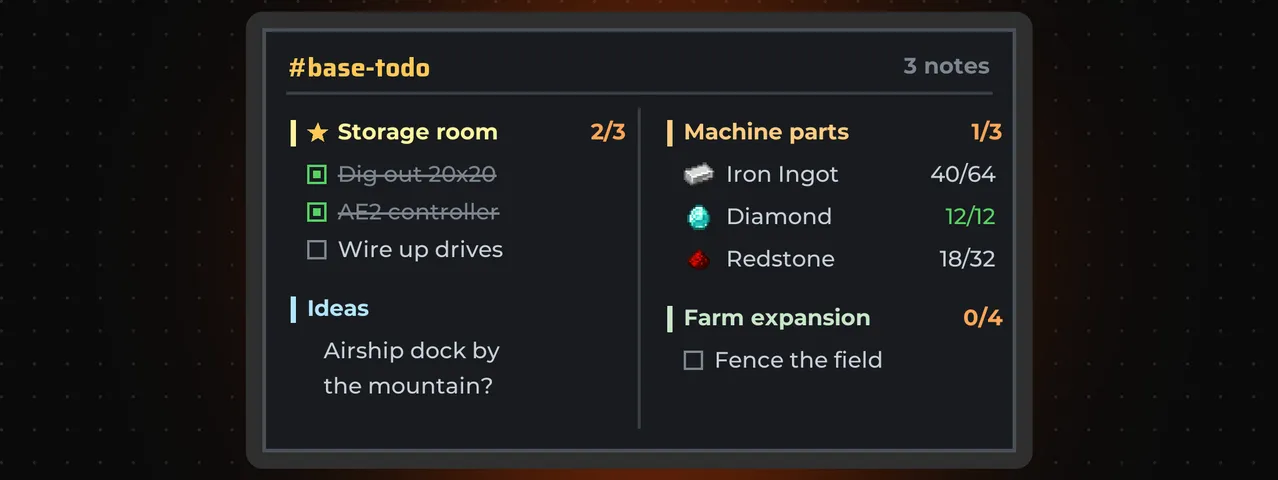
Noticeboard adds display boards for sharing plans with your friends. Write a note, a to-do list or a list of items to gather, and it shows on the wall in bright, easy-to-read text, like a Create display board.
Every board tuned to the same channel shows the same notes, so a board at spawn and a board at your base stay in sync on their own. Boards placed side by side merge into one big screen.
Notes and lists
Needs Noticeboard on the server as well as on each player’s game.
- Text notes, to-do lists that show who ticked each line, and item lists with a count for every item.
- Search every item in the game for your lists, or type @modname to filter by mod.
- Hand items straight in from your inventory. The list keeps them safe, and editors can take them back out.
- Track up to three lists in the corner of your screen while you play. They update live as anyone ticks or gathers.
- Pin important notes to the top, and give each note’s title its own colour.
Boards and channels
Boards tuned to the same channel show the same notes, anywhere in the world.
- Boards that touch merge into one screen, up to 8 by 8 blocks per section, with a single frame around it.
- Create-style placement: aim near the edge of a board and an outline shows exactly where the next one goes.
- Per-wall display options: text size, hide finished lines, or pinned notes only.
- Watch a channel to get a pop-up when someone adds a note or finishes a list.
- Channel owners choose whether anyone can post or members only. Every change is checked by the server.
Quick start
Your first board
- Install Noticeboard on the server and on every player’s game. In singleplayer, your game is enough.
- Craft a board (glass panes around black dye, with stick, planks, stick below) and hang it on a wall.
- Right-click it and type a channel name, such as
base-todo. A new name creates the channel. - Press + To-do, add some lines and press Save. It shows on the wall for everyone.
Versions
- Minecraft 1.21.1
- NeoForge
- Minecraft 1.20.1
- Forge and Fabric
- Noticeboard is needed on the server and on every player’s game.
- Jade is optional. With it, looking at a board shows its channel and note count.
The guide
Get started
Use
- Walls and displayBuild one big screen from many boards, extend it the easy way, and choose how it shows your notes.
- Notes and listsWrite notes, tick off to-dos, gather items, hand them in, and keep a list on your screen while you play.
- Channels and permissionsWho can post, edit and change settings, and how to get alerts when a channel changes.
Made by Hardline Interactive with Claude Code (AI).
Licence. All Rights Reserved. You’re welcome to use Noticeboard in modpacks, and to stream and make videos with it.